
The Redirects metric shows how many views were sent to your next page after a video ended with the Countdown Timer / Redirect end-of-video action. It measures how many viewers actually moved forward in your funnel, instead of estimating from video completions.
Availability & Restrictions
- Available from Starter Plan and up
- Only applies to videos using Countdown Timer / Redirect. Other videos show 0
- Redirects are tracked from August 21, 2026. Earlier dates show 0
- Shows the number of redirected views, not a redirect rate or percentage
- Not available in Smart Vids step statistics or on the Dashboard
How to Set Up Redirect Tracking
- Open Vid Settings → Playback → End of Video Action
- Select Countdown Timer / Redirect
- Add the link viewers should visit after the video ends
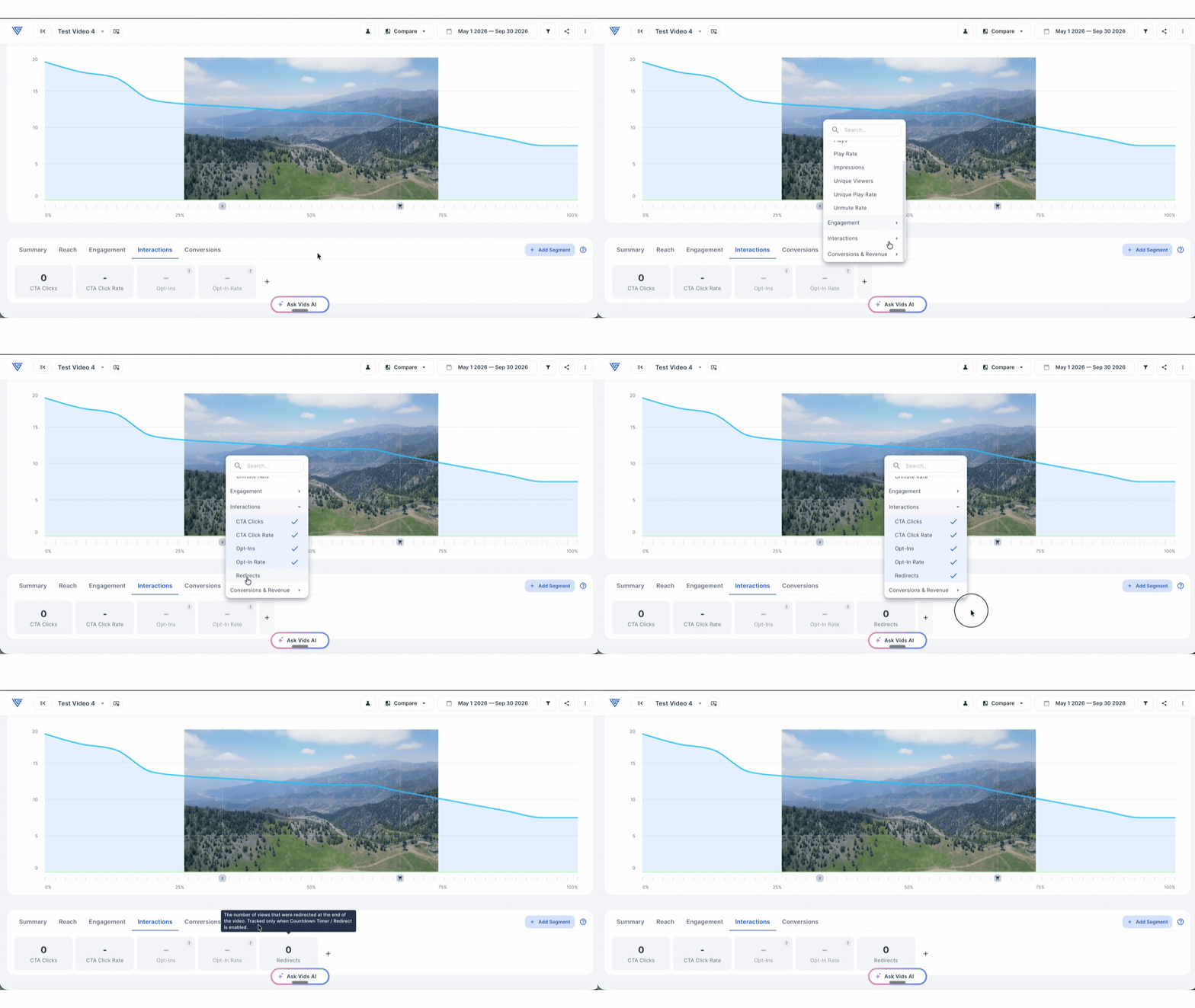
Redirects are counted automatically once the action is enabled. For more on this action, see End of Video Actions.
View Redirects for a Video
- Open Vid Stats for the video
- In any metric group, click + to add a metric
- Select Redirects from the Interactions section
You can analyze redirected views in the timeline, funnel, segments, and comparison views to see how they change over time, across viewer segments, or between compared videos and periods.
Compare Redirects Across Videos
Open Analytics → Videos to review redirects across your videos. You can:
- Add Redirects as a column in the videos table
- Select Redirects as the graph metric
- Export the data as a CSV file
Compare Redirects in an Experiment
To see which variant moves more viewers to the next page:
- Open the experiment
- Enable the Redirects column in the variant table
- Compare redirected views across your variants
How Redirects Are Counted
- Each view counts as a redirect once at most
- If a viewer closes the tab or leaves the page during the countdown, no redirect occurs and the view isn’t counted
- Redirects are also available through the Vid Stats timeline endpoint in the Public API
Why Does Redirects Show 0?
The selected video or time period may not have any tracked redirects. Check that:
- The video uses Countdown Timer / Redirect
- The selected date range starts on or after August 21, 2026
If you have any questions, reach out to our Customer Happiness Team at hi@vidalytics.com.