
The Vidalytics Agency account makes it easy to move in and out of your clients' accounts with just a click — no separate logins, no extra steps.
How to Jump Into a Client's Account
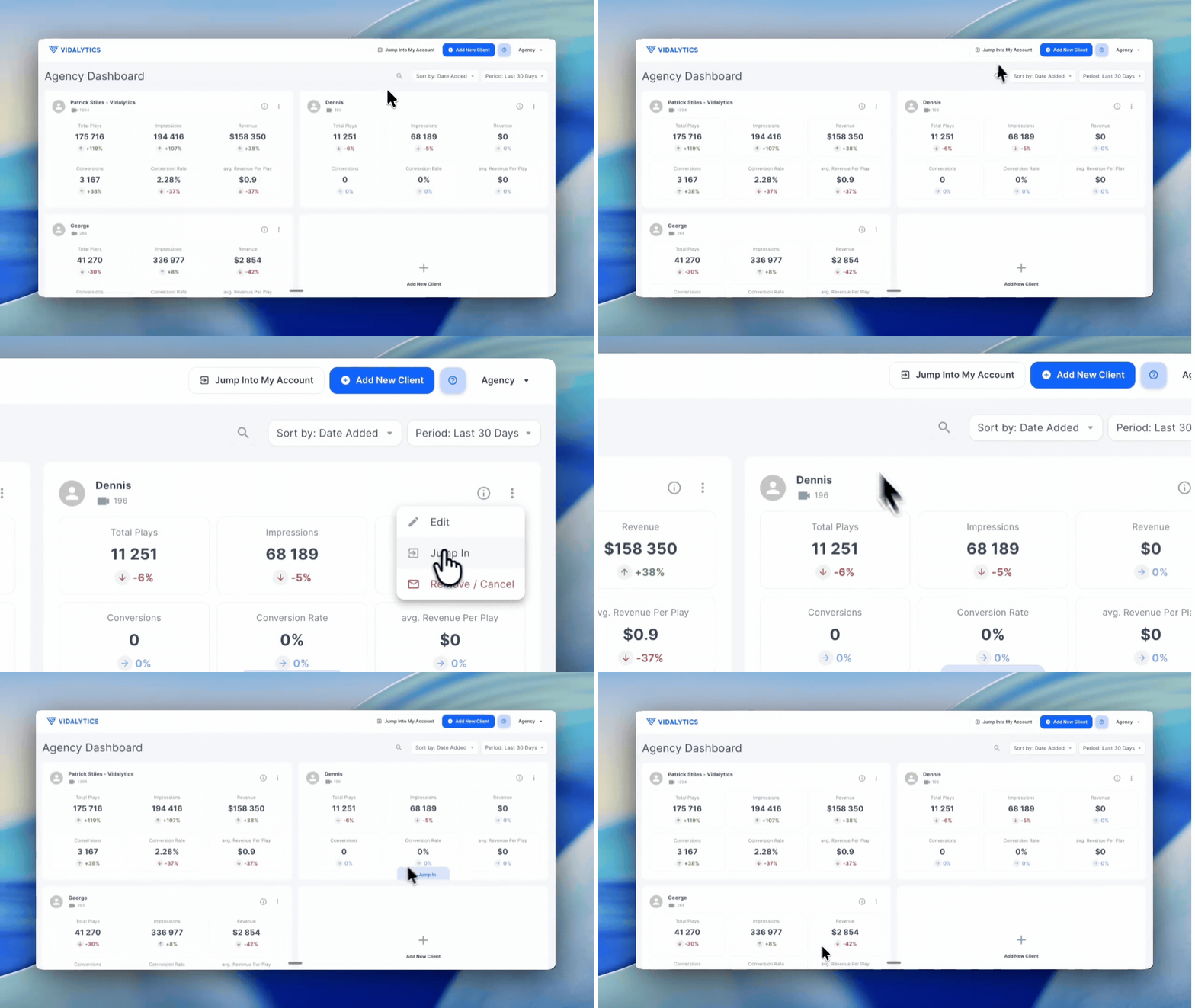
From your Agency dashboard, you have two ways to access a client's account:
Option 1 — hover over the client's slot and click the Jump In button that appears below it.
Option 2 — click the three vertical dots inside the client's slot and select Jump In from the menu.
That's it — you are now inside your client's account and can work on it directly.
How to Get Back to Your Agency Account
When you are ready to return to your Agency dashboard, look for the "Back to Agency" button at the top of the screen and click it.
Tip: Always check the top of the page when working in your account. A banner will indicate when you are inside a client's account so you always know exactly whose account you are working in — and avoid making changes in the wrong place.
If you have any questions, feedback, or need assistance, feel free to reach out to our Customer Happiness Team at hi@vidalytics.com.